Showing posts with label Mobile Trick. Show all posts

Monday, 18 March 2013

How TO Send Fake SmS


How to Send Fake SMS With Others Mobile Number
Fake Sms is a fun way to prank out with your dearest friends. Well this should only be used for a limited access to play with your Homies but some can take advantage of this technique and f*** everything up by pranking and making problems for others.
With this trick you would be able to send Fake Sms from anyone's number, Yes that’s right you can put your friends enemy number and send him a message. You can do anything but remember this is just for educational purpose any illegal attempt can be taken as a serious crime.

Procedure For Sending Fake Sms :

1. Go to SmsGlobal.com
2. Now simply click the New User and sign up for an account entering credentials like I have done in the image below.
How to Send Fake SMS
3. After successful sign up you will see the confirmation that code has been sent to your phone.
4. Now simply grab your registered mobile number and go to SmsGlobal.com and put your Username and your Password which you received on your mobile number.
How to Send Fake SMS
5. You will see Window like above simply click on Send Sms to Number.
6. You will be presented with this layout just enter the information as said in the image below.
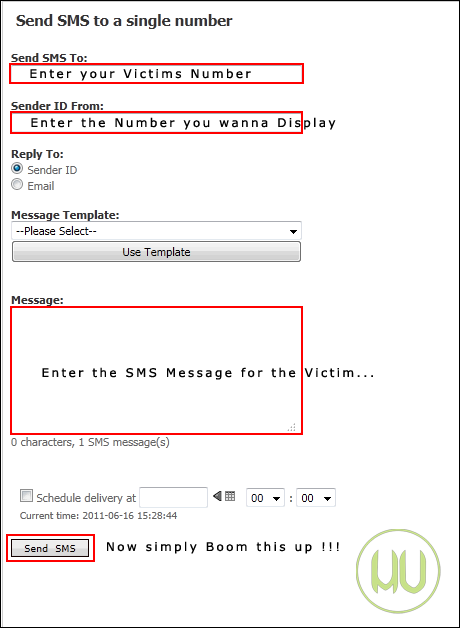
How to Send Fake SMS
7. That’s all, you were successful to prank your dearest friend so have fun with this service but don’t make anyone cry with this service.
Update : As reported by many readers now this website does not provide you with any free credit so you have to purchase their account to get it to work.
Disclaimer : The post is for educational and fun purpose only, HackingUniversity is not responsible for any kind of loss or damage. Its is considered as illegal, Do this @ ur own risk.

Saturday, 16 March 2013

How To Access Facebook Without Internet in Mobile


Now Facebook users in India can access Facebook on any mobile without any internet connection, just by dialing *325#. You can even access Facebook on a mobile phone which has no browser or other form of data connectivity like EDGE / GPRS / 3G.
Facebook India has partnered with Fonetwish to bring Facebook on every mobile phone without requiring any apps or even the Internet. Fonetwish is an USSD [Unstructured Supplementary Data] based interactive service which brings the power of internet to every mobile phone.

Updating your status is completely free, but for other features, like posting on a wall, checking notifications, and adding friends  there is a subscription service that charges Rs. 1/ day for unlimited usage.

How does it works?


All a user needs to do is dial *325# from their mobile handset and enter their Facebook username and password, after which one can access Facebook features. It uses USSD to transfer information from and to your mobile handset. Just like checking your mobile balance. See the image below:

 Facebook without Internet Fonetwish
Enter your username (email)


Facebook without Internet Fonetwish
Enter your Facebook Password

Facebook without Internet Fonetwish
Facebook Menu


You can use the following numbers for quick access to the menus:


Update your status: *325*1#
News Feed: *325*2#
Post on friend’s Wall: *325*3#
Notifications: *325*4#
Unsubscribe from this service: *325*22#
This service is currently available on limited number of network operators like Airtel, Aircel, Idea and Tata Docomo users in India. The service will be available on all other major networks very soon.

Thursday, 7 March 2013

Get Details about Stranger through his Name or Number


Well yes you heard it right, many times you get calls from strange numbers you don't even know and yet they try to advertise some products or maybe they are your friends trying to do a prank with you, well so you always think that if you has some technology to see who is really calling from that number or who owns that number.
Well now you can do all that stuff as a free app called "TrueCaller" is available for both iOS and Android devices.
truecaller-app
Well this app syncs everything from your contacts and provide it globally to everyone searching that number or name. So its like a give and get feature, you give something globally and receive something globally.

Search Name, Number, Address with TrueCaller

So now with this app you can search for anyone's number, name or address, so if it finds any information it will display who owns that number + what telecom service he is using. So this can be amazing if you have some hint about the number you can pump in that and it will show you the name of the party who owns that number so than you can add him or her or even call them.
Now in the Android version they even show the name for stranger when any call comes, that's stuff is not available for iOS devices yet but maybe soon in future it will be available. So if any number is globally blocked or blacklisted than it will show that number is blacklisted and maybe that person could be fake.
So overall this turned to be pretty useful in terms of searching and maintaining your contacts so now you can get this as an app for Android Devices, iOS Devices, Blackberry, Symbian Devices and even the best part is you can lookup for any number right on their website without any phone but that needs you to sign in with your Facebook or any other social account not a big deal.
So now visit their website, navigate to download page and install this app on your phone or you can make a search on their homepage. Have fun using this app and do comment if you find any problem :)

Send Online Free SMS without Internet from Airtel & Docomo


160by 2 and Way2SMS are the two biggest name’s in online message marketing, they have individual and business accounts that can be used to greet and send money making advertisements through sms. Well obviously you need Internet to get access to these services and even to send messages to your friends. But obviously telecom brands come up with some offers that you can use there service to send free sms without any internet so now Airtel and Docomo have come with an service to send sms through 160by2 and Way2SMS but without internet and that too from your Airtel and Docomo numbers.
Now this trick is pretty much working for both 160by2 and Way2SMS using your Airtel and Docomo Numbers. So just check out below steps and enjoy.
NOTE Make sure that your balance is Rs.1, else your money can get deducted per sms. So if its is Rs.1 this trick will work and your money will not get deducted.

160By2 SMS without Internet from Airtel & Docomo

Well I tried using 160By2 account with this trick and it worked I just got my account created and my sms were activated so now I can send free sms from my Airtel number to anyone using 160By2 and that too without any access to internet. So now if you want to send free sms from 160By2 just follow below steps.
free-sms-without-internet
  1. Open up your messages and create a new message to 55444 typing below message.
    #ACC username password
  2. Now just replace the username and password with your 160By2 credentials.
  3. Now you will receive a response message from them saying account verified and created, just check the above screenshot.
  4. Now your account will be created you can send free sms, make sure balance is Rs.1
  5. Just create a new message with below format.
    #SEND 999xxxxxxx Hey Wazz ! Up.
  6. Now replace xxx with your friends mobile number and than your personal message.
  7. That’s it now just send this message and your friend will get your message.

Way2SMS without Internet from Airtel & Docomo

Well I do not have any screenshot demonstration for Way2SMS as I have not tested this one but you can follow below steps and start your own free messaging.
  1. Make sure your balance is less than Rs.1.
  2. Now create a new message to 55444 typing #SMSFree to get more information.
  3. Now to register yoru Way2SMS account just send the below message.
    #smsfree reg username password way2sms
  4. Now replace the username and password with your Way2SMS credentials.
  5. Now your will be logged in, now type below message to send free sms.
    #smsfree 1 999xxxxxxx Hey Wazz ! up.
  6. Now replace xxx with your friends mobile number and your personal message.
  7. That’s it now just send this message and your friend will receive it on their mobile.
So now in this way you can send free sms to your friends with your mobile without using internet. If you find this post useful just share it with your friends :)

Monday, 18 February 2013

How to Read Blackberry® BBM messages without notifying the sender.


I know each and every Blackberry® user has had this or a similar scenario happen to them. You get a BBM from someone that you either don’t have the time to respond to, are ignoring, or just don’t feel like messaging back at the time, but you really want to see what the message says. The problem is, if you open that message it will notify the sender that you have, in fact, read the message by changing the ‘D’ for delivered to an ‘R’ for read on their phone. This easy little detour will allow you to read the full message without changing the status of the message on the senders end.
To view the message without them knowing, perform this trick:
Part One – Enable BBM History.
1. Open your BBM and click the Blackberry button   and select ‘Options’
2. Scroll down to the bottom of the option menu and enable ‘Save Message History’
3. Click the Blackberry button again and ‘Save’.
Part Two – The Detour
1. Open your BBM Messenger again and highlight the person who sent you the message that you want to read, click the Blackberry button and select ‘View History’.
2. Select today’s date and read the last message sent!
This will not a) notify the person that sent you the message that it’s been read, and b) will not remove the notification that you have a new message so you still know you still have to respond to it.
Now for some blurry video!
*This was tested on two Blackberry Curve 8530′s running BBM 5.0.0.

Legal Disclaimer: The Trademark BlackBerry® is owned by Research In Motion Limited and is registered in the United States and may be pending or registered in other countries. Fixitts.com is not endorsed, sponsored, affiliated with or otherwise authorized by Research In Motion Limited.

Sunday, 27 January 2013

Zune Software

Nokia Lumia 710 Zune Software Download


nokia lumia 710 zune software download for windows Microsoft windows Xp, 7.

Click here to Free Download Nokia Lumia 710 Zune Software.
Please note: The Zune software works on Windows XP SP3 and later versions only.

Sunday, 23 December 2012

Android Key-logger: KidLogge


Zip File Attached with thread + Read 'readme' file to install in Android 2.1.. Installation tutorial below if for Android 2.2 above
***************************************************************
Installation 
***************************************************************
1. Install APK file ( KidLogger.apk )

2. Open KidLogger Application

Please note: 
- ON TABLETs install Tkeyboard.apk in order to open control panel, see below.

3. On the KidLogger control panel 
  - open settings > upload
  - and enter device ID from your KidLogger.net account dashboard.
  - click Send Test Report. 
    Ensure status is OK.
  - on the main screen click "Start Log" 
  - click "Back" to leave KidLogger app running on the background.

Now we needed to install kidlogger keyboard:


KidLoggerKeyboard.apk - virtual on-screen keyboard. replaces original keyboard and allows to record into KidLogger log all keystrokes.

1. Install KidLoggerKeyboard.apk 

2. go to Phone Settings > "Language & Keyboard" > enable "SoftKeyboard PRO" input method. 

3. Open "SoftKeyboard PRO setting" 
  - CheckInput Languages to enable more Input Languages in on-screen keyabord if you use a few one.

  - enter *123456# in order to open Kidogger control panel ( in case you have a Tablet)

4. In a web browser - a long-click (click and hold your finger 2 sec) over an Address Field  > choose "Input Method" 
    choose "SoftKeyboard PRO".

Done!

Now all typed text and keystrokes on this keyboard will be recorded to the log within KidLogger App. 
Also other phone activities are now logged into the log files separated by days.

***************************************************************
Removal
***************************************************************

1. Open Settings > Applications > find KidLogger in the list and click Remove.
2. the same for Soft Keyboard PRO.


***************************************************************
Known Issues
***************************************************************


1. On low-resources Phones\Tablets it may work unstable if all log options are enabled.
  Solution: Disable Clipboard Log, Idle, SD Card, Power, GSM events, WiFi, 

2. On Tablets a few logging options may not work : Clipboard Log, Idle, Power, WiFi, USB, FlyMode.

2. On Tablets a few logging options does not work : SD Card, GSM events, SMS, FlyMode, Calls 

"This tutorial is Education Purpose only don’t misuse it Trick2do will Not Hold any responsibility".

Saturday, 22 December 2012

Trace any Mobile Number in India


Hello,
Now I am Posting on "Trace any Mobile Number in India"

To Do this,Just Follow the Below Steps.

First Go To Anyone of These Sites--->


In the First Site,Enter Your Digit Mobile Number You want to trace and Hit ENTER aur Click on TRACE Button.

                       [IMG]

In the Second Site,
Enter the 10 Digit Number You want to trace and Hit Enter aur Click On TRACE Button.
                  [IMG]


What Info Does the Site Provides Us about the Phone Number?

The Above Sites Will Provide you with the Following Information--->

1. Sim Zone (From Where the sim was registered.)
2. Operator Name (For Example- Vodafone,Idea,Airtel,etc)
3.Signalling (i.e-It is either GSM or CDMA)

I Hope This Information would Help you.

"This tutorial is Education Purpose only don’t misuse it Trick2do will Not Hold any responsibility"

Thursday, 20 December 2012

Whats App Hacking :)

Desktop IMs have long been our favorite mode of communication. But with time, their significance has definitely come down.
Smartphones taking large part of our daily life, IM services like Whatsapp, iMessage, BBM, etc have emerged to be exchanging more messages every second. WhatsApp delivers more than 1 billion messages per day, but yet, its the most insecure way of communication.

As per a recent security analysis, WhatsApp is totally insecure way of communicating with friends.


WhatsApp Encryption

You will be surprised to know that until August 2012, messages sent through the WhatsApp service were not encrypted in any way, everything was sent in plaintext. That means if you were using Whatsapp on a public wifi, everything can be captured by anyone else sniffing ont he wireless network. The latest WhatsApp uses encryption but its this new encryption is broken. But still, phone number is sent out in plaintext.
WhatsApp API & Reverse Engineering

If you know XMPP, the same protocol used by facebook, GTalk, and several others, you can try your hands-on WhatsAPI, an API for WhatsApp messenger.
WhatsApp uses customized XMPP server with proprietary extensions, named internally as FunXMPP.
1. WhatsApp Authentication / Login Mechanism
Just like any other XMPP, WhatsApp uses jabber id and password to login. The password is hashed, stored in servers upon account creation and used transparently everytime the client connects the server.

Its an incredibly horrible implementation. As researcher found out, the username is the user’s phone number – an attacker would probably already knows the victim’s number.
On Android, the password is a md5 hash of the reversed IMEI number:
$imei = "112222223333334"; // example IMEI
$androidWhatsAppPassword = md5(strrev($imei)); // reverse IMEI and calculate md5 hash

On iOS, the password is generated from the devices WLAN MAC address:
$wlanMAC = "AA:BB:CCD:EE:FF"; // example WLAN MAC address
$iphoneWhatsAppPassword = md5($wlanMAC.$wlanMAC); // calculate md5 hash using the MAC address twice

Both IMEI and MAC address are easily retrievable from devices if you have physical access to it. MAC address is much easier to capture as you can sniff on the wireless network to which iOS device is connected.
The JID is a concatenation between your country’s code and mobile number.
Initial login uses Digest Access Authentication. You can try this for yourself:
https://r.whatsapp.net/v1/exist.php?cc=$countrycode&in=$phonenumber&udid=$password $countrycode = the country calling code $phonenumber = the users phone number (without the country calling code) $password = see above, for iPhone use md5($wlanMAC.$wlanMAC), for Android use md5(strrev($imei))
The response you would receive would be in XML, containing messages designated for your phone.
2. Text Message communication
Messages are basically sent as TCP packets, following WhatsApp’s own format (unlike what’s defined in XMPP RFCs).
Photos, Videos and Audio files shared with WhatsApp contacts are HTTP-uploaded to a server before being sent to the recipient(s) along with Base64 thumbnail of media file (if applicable) along with the generated HTTP link as the message body.


"This tutorial is Education Purpose only don’t misuse it Trick2do will Not Hold any responsibility"

Friday, 3 August 2012

HOW TO SEND FREE SMS ALL OVER THE WORLD USING YOUR ANDROID PHONE

Hello Every one this Post  is based on sending free sms over world hope you all will like it :))


  • First of all you have to download app for your android mobile, Download it from below link (contains .apk file) .
[#] To Download : Click Here 
  • Now you have to install it in your Android Mobile .

  • Open the app & then it will ask for registration, so register & while registration they ask some zip codes and that's very important to complete registration . write any one of the zip code form below .
1.    98660
2.    98661
3.    98662
3.    98663
4.    98664 
5.    98664
  • After completing registration, send free SMS to any where in world .

Note: 
  1. Even you can remove the advertisement . Just you have to open setting in app and go to signature and delete all and save it :)


  • Now this is necessary to know that  they provide you some other Number like ''+1593933929'' , so before sending SMS to your your friends or any one just tell them i am using another sender number,  so kindly change send reply on my number. if they reply you on pinger no.(which they provided you) .
  • Monday, 30 July 2012

    Shutdown your computer using your cell phone

    How to Shutdown your computer using your cell phone 


    Requirements :

     
    1) You Need to Create Shutdown.bat file

    2) You Need to Create an account in Gmail or in any mail .

    3) Need Microsoft Outlook 2003 or any Version.


    Procedure to Create .bat File

    Open Notepad

    Write Shutdown -s

    save it as shutdown.bat 

    Create an Account in Gmail .

    after these you need to configure Outlook for mail.  

    i am providing a video tutorial for configuring Outlook..


    .bat file Options:

    shutdown -s { this will shutdown the computer }
    shutdown -r { this will restart the computer }
    tskill firefox { exits firefox }
    start firefox { opens firefox }
    msg * "What you want here" { displays message }


    Make Free 10 Calls/Day for Unlimited Time using Crowd Call

    Crowd Call is basically a new and secure concept for conferencing your friends or business clients right from your smartphone. With Crowd Call you get 10 free calls/day to call over 40 countries worldwide. There is no time limit for any call 1 call can be as long as you want and the person you are going to call does not need to have any app installed in his phone, he just needs to have a valid phone number and he can be invited into conference.

    The only thing you need is an iPhone or Android device installed with the Crowd Call app and rest part is covered by crowd call itself, the other party do not need to have any app installed but just a regular number and they receive your call right by your own number.
    So as you can see in the above image I am just calling my friend "Atinder" whom I just chose from my contacts list and than I just pressed the Call Now button and I got a message that crowd call is in progress and I will receive a call soon. So now I just received a call from Crowd Call and when you answer you need to press 1 to start calling other party.
    Hmmm well now I hope I have cleared out everything well you can visit CrowdCall official website for apps download and further information. Thanks to my friend "Guneet Anand" for telling me about this wonderful app…

    Remember You get 10 free calls per day which you can use to call over 40 countries, on iPhone at a time you can select 2 person to call together and after the call is connected you can again minimize the call and call another two persons and merge call together for free 5 person conference call, and also repeat this step fro more person adding.

    Wednesday, 25 July 2012

    Download Whats App For All Multimedia Phone


                                    About Whats App


    WhatsApp Messenger is a cross-platform mobile messaging app which allows you to exchange messages, Music, Pictures, Any Data maximum size to send is 12mb without having to pay for SMS. WhatsApp Messenger is available for iPhone, BlackBerry, Windows Phone, Android and Nokia.

    Android

    Minimum requirements:

    • Android OS 2.1 or above


  • Unlimited internet data plan recommended
  • Tablet devices are not supported

  • For Android Click Here

  •   

  •   BlackBerry

    Minimum requirements:

    • BlackBerry OS 4.6 or above


  • BlackBerry Internet Service (BIS) or BlackBerry Enterprise Service (BES)


  •    For BlackBerry    Click Here


    iPhone 


      For iPhone from iTunes App Store Click Here


      Nokia Symbian


    Minimum requirements:

    • Unlimited internet data plan!


  • Nokia S60 3rd edition, 5th edition, Symbian^3, Symbian Anna, or Symbian Belle Operating System
  • Supported device list:


    • Symbian: X7 · E6 · N8 · C6 · C7 · E7 · 500 · 600 · 603 · 700 · 701 · 808


  • S60 5th edition: Nokia 5800 · Nokia 5530 · Nokia 5230 · Nokia 5233 · Nokia 5235 · Nokia N97 · Nokia N97 mini · Nokia X6 · Nokia X5-01 · Nokia C6 · Nokia C5-03 · Samsung i8910 Omnia HD · Sony Ericsson Satio · Sony Ericsson Vivaz · Sony Ericsson Vivaz Pro
  • S60 3rd edition: Nokia 5700 · Nokia 6110 · Nokia 6120 · Nokia 6121 · Nokia 6124 · Nokia 6700 · Nokia 6290 · Nokia E51 · Nokia E63 · Nokia E66 · Nokia E71 · Nokia E90 Communicator · Nokia N76 · Nokia N81 · Nokia N81 8GB · Nokia N82 · Nokia N95 · Nokia N95 8GB · Nokia 5320 · Nokia 5630 · Nokia 5730 · Nokia 6210 · Nokia 6220 · Nokia 6650 fold · Nokia 6710 Navigator · Nokia 6720 · Nokia 6730 · Nokia 6760 Slide · Nokia 6790 Surge · Nokia C5 · Nokia E52 · Nokia E55 · Nokia E72 · Nokia E73 · Nokia E75 · Nokia E5 · Nokia N78 · Nokia N79 · Nokia N85 · Nokia N86 8MP · Nokia N96 · Samsung GT-i8510 · Samsung GT-I7110 · Samsung SGH-L870 · Samsung SGH-G810 · Samsung SGH-iNNN

  • For Nokia Symbian Click Here

  •   

       Nokia S40

    Minimum requirements:

    • Unlimited data plan!


  • Nokia Series 40 phone.

  • Supported devices:

    • Nokia C3-00 · Nokia C3-01 · Nokia X2-01 · Nokia X3-02 · Nokia X2-00


  • Unsupported carriers:

    • C3-00 devices on Telcel in Mexico (please go here for more info)

  • Vodafone in Portugal
  • VIVO in Brazil
  • Claro in Argentina
  • Airtel, Idea, Vodafone, Tata Docomo and possibly others in India


  •      NOKIA S40 Click Here


       WINDOW PHONE

       For Windows Phone from Marketplace Click Here