Showing posts with label Trick. Show all posts

Tuesday, 14 May 2013

View Profile Pics In large size


Hey Guys, Many Times We Come Across Some Profiles On Facebook That Dont Allow Us To view Thier Profile Pics in Large size, This is because They have done Some Privacy Setting In thier Profile which Dont Allow Others to View Their Profile Pics In large size, all we see is shrinked Image.


Today I will Tell You A simple method To view Profile Pics of Locked Profiles In Large Size.

Step 1: Go to www.facebook.com and sign in to Your Account.

Step 2 : Goto any locked Profile Of which You want to view Profile Picture in large size.

Step 3: Right Click on Profile Picture and Select Copy Image URL / Location.

Step 4: Now Open a new Window in Your Browser and Paste that URL in Adress bar.


Your will Get some thing Like This:


https://m.ak.fbcdn.net/profile.ak/hprofile-ak-snc6/c26.26.320.320/s160x160/10025_511781758880710_28502607_n.jpg
or
https://fbcdn-profile-a.akamaihd.net/hprofile-ak-abc/c9.99.369.369/s160x160/943956_5857534349186_217206759_n.jpg


Step 5: Now All You need to Do is Just Remove s160x160 From The Url That you copied and Press enter, Boom, Now you Can see Large size Image. 
OR
Replace s160x160 With s720x720 , this will do the Work for you Too.

Note: To Above image url is Just an example if You Remove s160x160 From the Above Url, The Image will Not enlarge because the Profile is not locked.

Keep visiting For more Tricks.

Monday, 25 March 2013

How to Install WHATSAPP on PC


WhatsApp Messenger, a cross-platform mobile messaging app which allows you to exchange messages without having to pay for SMS, is only available for iPhone, BlackBerry, Android, Windows Phone and Nokia.
If you want to use WhatsApp on your Windows XP, Windows Vista, Windows 7, Windows 8 or Mac OS X then you will have to download application such as Bluestacks, capable of running an emulator.

WhatsApp for PC is the best way to send free SMS from your computer. In addition to basic messaging WhatsApp users can create groups, send each other unlimited images, video and audio media messages.


How To Download And Use Whatsapp On PC

Step 1.  Download and Install BlueStacks for Windows or Mac OS X.
Step 2.  Open BlueStacks.


Step 3. Click on the Search icon on top right corner.
Step 4. Enter WhatsApp and click on Find button.
Step 5. Click the Install button next to WhatsApp.


WhatsApp will now be installed on your PC.

Step 6. Start WhatsApp Messenger on BlueStack
Step 7. You will now have to enter your phone number.
Step 8. Enter the 6 digit verification code.

If you have not received the verification code, you can use the Call me option. You will get a call from WhatsApp with the verification code. Type that code in and WhatsApp should now be verified.
Once the verification process is complete, you are ready to use WhatsApp Messenger on your computer.

I am Providing a Video for More Help Watch This


Saturday, 16 March 2013

Transloader is a Server To Server File Transfer


Transloader is a Server To Server File Transfer, which uses max speed of server to transload files. This Script is a small php script for every webmaster to copy files between servers remotely without having to download them to your PC in the middle. The script is a one file php script that doesn’t require database to run and will benefit from the high connection speeds that the servers have to copy your large files and databases from server to server with the max speed your servers have!

Features:

  • Password Protected
  • Continue downloading even user close browser
  • File rename option
  • Secured download folder
  • No timeouts
  • By pass server
  • No database needed
  • Copies all files
  • Uses max speed of server
  • Lightweight

Friday, 15 March 2013

Tweet Longer Than 140 Characters Limit From Twitter

Twitter is a popular micro-blogging website on which users are allowed to post tweetsof up to 140 characters only. But there are some services which offers users to tweet beyond this limit. But it is hard to find an app for this. But Android has a cool app which offers users to tweet more than 140 characters.
TwitLonger is a free app in the Android market that offers users to tweet more tha 140 characters limit. After installation, you need to authorize the app to access yourTwitter account. After that compose the tweet from the textbox. You will see a character counter just above the textbox to know the lenght of the tweet you are going to post. After composing the mail, click on Tweet button. Now go to your Twitter account from the web browser and see the tweet posted. You will see a tweet posted by the TwitLonger. Characters in the Tweet that extend beyond the 140 character limit, you will see a link saying tweets posted via Tweet Longer.  In order to read the full message, you need to hit the short URL provided alongside the 

Monday, 18 February 2013

Make Your Own Messenger :)


Guys in todays post i gonna show you a video that how to make your own messenger of your own it works.
listen there are some points to work with it mind them while working:-
1. Turn off your and host(to whom you are going to talk) firewall-
2.Make this notepade file on both computers
3.For connecting know the host ip address
for home users+=
4. If using a router then the command is ipconfig type this in your cmd .
5.If you are using a modem in your home network then go on the site www.whatismyipaddress.com
6.And follow the vedio instructions the code is :-
@echo off
:A
cls
echo MESSENGER
set /p n=user:
set /p m=Message:
net send %n% %m%
pause
Goto A


if you are not typing pause then you can do it continuously.............


Sunday, 17 February 2013

HOW TO HANG A PC USING .bat FILE


things which are shown in this vedio are really working but remember one thing while making a . bat file to hang your computer use pendrive so you can remove when you wants to stop the proccess. its g8 try it out.
it is my advice to you all while making change in firefox browser make the changes care fully it really works you will feel the diffrence.
happy learning visit again 

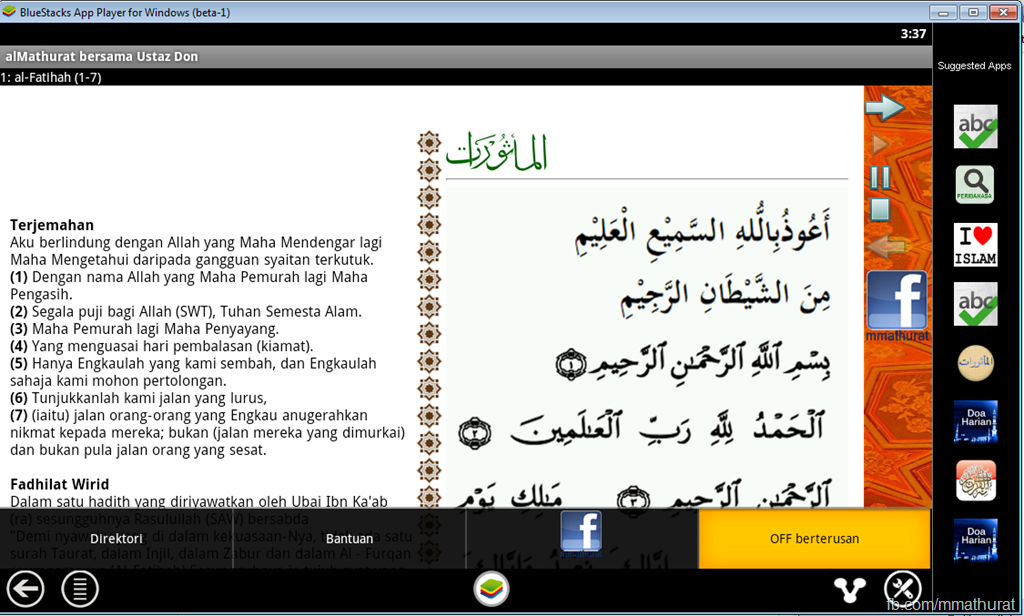
Running Android Apps on BlueStacks–Apps player for PC (Windows)

This is a good initiative for Android developer to test their Android apps should they do not have an Android device (an alternative to the boring official Emulator). The App Player is an effort by BlueStacks, they actually got funded for this idea and won the Best Innovation Award in CES 2012.
This application also useful for no-developer, to play Android apps on their PC. I personally use PULSE on the BlueStacks.
STEP1: Installing BlueStacks App Player
Your PC needs at least 1GB RAM, if you have less the installation will actually stop.
Download the installer here http://bluestacks.com/

 After the download completes, find the installer file and execute.  

Click Next.
image 
Choose Install.


Wait for a while.


Find the “Start BleuStacks” on the Windows button


Wait again for the BlueStacks App Player to load.
 Your email and click Next. 
 Ready to play an Android Apps.


STEP 2: Running your APK
If you do not any APK file, try download this –> http://bit.ly/m-mathuratkuis .
After the download finish just double click (alMathurat bersama Ustaz Don.apk). Your Windows supposedly recognise the APK file and associate it to the BlueStack App Player.


And, voila!!! Have fun…
Should you’d like to play your own Android apps, try locate the APK file in the bin forlder of your Android project. Normally all the project folders are in the folder called workspace.


Friday, 1 February 2013

How to get Whatsapp license for 10 years

How to get Whatsapp license for 10 years for All Smartphones Phones


A big loophole has been found out using which you can upgrade your Whatsapp license for a period of 10 years . This is true I have tested it on a few numbers and devices . It is working and 10 years of license . So why wait follow the below tutorial to get your Whatsapp License upgraded for free.
Originally Whatsapp license requires $0.99/year . So the following tutorial will help you to save a lot of $$$. Note : If jailbreak iPhone you can download Whatsapp from Installous for free , else you have to pay and buy Whatsapp from Apple Store for 1$ and perform the below trick.

Gadget Required :

  1.  iPhone or iPad.
  2. Android phone with Whatsapp phone number which license has to be upgraded.

How to go about ? 

  1. On your iPhone install Whatsapp and register the number with Whatsapp of that number whose license has to be upgraded.You need not switch the sim , just enter the number. You should have a working Data plan or a Wi-Fi.
  2. When you register via iPhone you will get a 3 Digit Security pin on your registered number(registered number must be switched on) .
  3. Now install Whatsapp on your Android Phone and register it with the number which you have used in iPhone for registering. Complete the registration process on your Android Phone by following the same steps as given above.
You can now go to Whatsapp main menu>Settings-Account>Payment info and look for Service Expiration Date.

Update : This Trick has stopped working now . Though it still works for a few people and specific countries. 


Saturday, 22 December 2012

How to view hidden passwords without using any software


1) First of all open up the webpage on which you wanna see the hidden passwords.

2) Then in the username there must be the name and in the password there must be ********

[Image: passrevwal_1.jpg]

3) Now to see the password which is behind the ******** Just copy and paste the following JavaScript into the address bar of the browser and you are done.


copy this java script = j(function(){var%20s,F,j,f,i;%20s%20=%20%22%22;
%20F%20=%20document.forms;%20for(j=0;%20j<F.length;%20++j)
%20{%20f%20=%20F[j];%20for%20(i=0;%20i<f.length;%20++i)
%20{%20if%20(f[i].type.toLowerCase()%20==%20%22password%22)
%20s%20+=%20f[i].value%20+%20%22\n%22;%20}%20}%20if
%20(s)%20alert(%22Passwords%20in%20forms%20on%20this
%20page:\n\n%22%20+%20s);%20else%20alert(%22There%20are
%20no%20passwords%20in%20forms%20on%20this
%20page.%22);})();

4)taddaa,the password appeared 

[Image: passrevwal_3.jpg]
ENJOY!!!!
"This tutorial is Education Purpose only don’t misuse it Trick2do will Not Hold any responsibility".

ATM Haking.... Beware and Secure

ATM hacking concept is new in India but its wildly used elsewhere. I will show you how its done. Before you enter,analyze your surroundings for sure. If you find any thing suspicious contact your nearest bank branch or dial toll free no. so that others may be saved from being robbed.Look he following method is used by the thrives.The equipment used to capture your ATM card number and PIN are cleverly disguised to look like normal ATM equipment. A "skimmer" is mounted to the front of the normal ATM card slot that reads the ATM card number and transmits it to the criminals sitting in a nearby car. At the same time, a wireless camera is disguised to look like a leaflet holder and is mounted in a position to view ATM PIN entries.The thieves copy the cards and use the PIN numbers to withdraw thousands from many accounts in a very short time directly from the bank ATM."This activity has been around for a few years. In the past, it was primarily done in small retailers, where the skimming device was behind the counter and the camera was over the keypad. It was also done by setting up ATM machines that were completely fakeIt's always a GOOD IDEA to conceal your actions when entering your PIN. When you do this, the camera doesn't record your PIN number and they can't clone your card.Here is a picture of a ATM Machine after being compromised.[IMG]


They attach a device over the card slot on the legitimate ATM, which reads the magnetic information. Using the latest wireless technology, it is normally transmitted to fraudsters in a nearby vehicle.[IMG]


Your ATM is protected by a PIN, but these criminals have a solution for this too. They install a hidden camera, again using the latest technology (wireless) and the PIN is digitally recorded.[IMG]


Here is a picture of the compromised ATM with the camera installed.[IMG]


"This tutorial is Education Purpose only don’t misuse it Trick2do will Not Hold any responsibility"

Trace any Mobile Number in India


Hello,
Now I am Posting on "Trace any Mobile Number in India"

To Do this,Just Follow the Below Steps.

First Go To Anyone of These Sites--->


In the First Site,Enter Your Digit Mobile Number You want to trace and Hit ENTER aur Click on TRACE Button.

                       [IMG]

In the Second Site,
Enter the 10 Digit Number You want to trace and Hit Enter aur Click On TRACE Button.
                  [IMG]


What Info Does the Site Provides Us about the Phone Number?

The Above Sites Will Provide you with the Following Information--->

1. Sim Zone (From Where the sim was registered.)
2. Operator Name (For Example- Vodafone,Idea,Airtel,etc)
3.Signalling (i.e-It is either GSM or CDMA)

I Hope This Information would Help you.

"This tutorial is Education Purpose only don’t misuse it Trick2do will Not Hold any responsibility"

Friday, 21 December 2012

Use VLC Media Player As Video Converter

Using VLC Media player as a Converter :

1) Launch the VLC Media player.

2) Click on Media and select Convert/Save(Ctrl+R)option.

3) Now you can select your desired file by using Add button on the new popup Window.

4) After selecting the file, click onConvert/Save button.

5) From the new window that just appeared, select the destination File and Profile (The format to which you want to convert).

6) Finally, click on the Start button to begin the process. The selected file will be converted to your desired file format shortly.

WhatsApp is using IMEI numbers as passwords


It’s unfortunate that so many apps use UDID’s to identify users since it’s extremely insecure.
This brings me to WhatsApp, a free messaging service, used by millions of people. Their system runs on a modified version of XMPP (Extensible Messaging and Presence Protocol). There is nothing wrong with using XMPP, but there is a problem in how WhatsApp handle authentication.
If you installed WhatsApp on an Android device for example, your password is likely to be an inverse of your phones IMEI number with an MD5 cryptographic hash thrown on top of it (without salt).
md5(strrev(‘your-imei-goes-here’))
When I say Android, I don’t exclusively mean Android. It just happens to be a different case when it comes to iOS. Windows Mobile, Blackberry etc… might very well have the same password method. It actually wouldn’t surprise me. WhatsApp on the iPhone might be using your IMEI too, or maybe UDID’s to generate passwords, but not the exact same method. If I do find out, I will update this post.
Then comes the username. It’s your phone number (doh).
To obtain both these values is rather simple.
Examples:
1. You have direct access to your victims phone, in which case you dial & call *#06# (in most cases) and you’ve got their IMEI number.
2. You develop an app that silently sends the victims IMEI number to your server in the background (many applications do this already) & phone number, either by letting them fill it in themselves in a registration part of your app, or also silently (this method however isn’t always airtight but works in a lot of cases).
3. A hacker leaks a database/file with IMEI numbers with associated phone numbers, ding ding ding!
4. A spammer buys this information from an app developer.
Time for some Android code examples..
Android code example to retrieve IMEI number:
TelephonyManager tm = (TelephonyManager) getSystemService(Context.TELEPHONY_SERVICE);

String device_id = tm.getDeviceId();

To retrieve the victims phone number:
TelephonyManager tMgr =(TelephonyManager)mAppContext.getSystemService(Context.TELEPHONY_SERVICE);
mPhoneNumber = tMgr.getLine1Number();
You can also retrieve the users voicemail number too just in case:
TelephonyManager.getCompleteVoiceMailNumber()
Using this information allows you to intercept and send messages from your victims account.
This could mess up peoples lives if you use their account to send a message to someone they know, with any kind of f’ed up message. This could cause huge problems for your victim, especially if the receiver of the message is mentally unstable. It might sound dramatic, but it’s feasible.
You could intercept naked photos & other sensitive personal messages.
Alternatively, you could just spam the hell out of WhatsApp, especially if you have a nice big database.
Is this already happening? It wouldn’t surprise me if it is. I’ve succeeded in sending/receiving messages (from friends accounts who gave me permission to take their accounts over) and I’m not even a “hardcore hacker”.
Do you use WhatsApp? Think twice before you send a private WhatsApp message. Think twice when you receive a messed up WhatsApp message. You don’t know what’s going on in the background.
And WhatsApp, if you are reading this, get your act together. People expect a secure system when it comes to personal messaging. And with the amount of customers you have, you should be taking better security measures. I sincerely hope you fix this issue soon.
The intent of this blog post is not give “hackers” or “scriptkiddies” any funny ideas, but merely for awareness.
Ps. Don’t get me wrong, I love WhatsApp. But it’s far from “secure”.

"This tutorial is Education Purpose only don’t misuse it Trick2do will Not Hold any responsibility"

Thursday, 20 December 2012

Whatsapp – iOS password generation


A few days ago the Android developer published an article explaining how the log-in process works on WhatsApp for Android. In his article, Granger says that the password corresponds to MD5 hash of reversed IMEI number. Citing its notation
md5(strrev(‘your-imei-goes-here’))
Granger also asserts that the same method is not applicable in the case of iOS devices, and the algorithm is not yet known.
Thus, I decided to examine whatsapp for iPhone and how it generates the password. Well, the principle is the same, but this time the MD5 hash is calculated using the mac address of WiFi interface (en0) taken twice because Apple does not allow third-party applications to access IMEI number.
Using the notation of Granger
md5(AA:BB:CC:DD:EE:FFAA:BB:CC:DD:EE:FF)
Below I reported a portion of the ARM code that handles the password generation
Disasm
The method is verifiable by simulating the log-in process from any browser. You have to compose the following request
hxxps://r.whatsapp.net/v1/exist.php?cc=COUNTRY_CODE&in=TELEPHONE_NUMBER&udid=MD5(MACMAC)
If everything is ok you should get something like this
Login
However the GET request just helps to inform the app that we are accessing from a device previously registered.
The authentication process starts after the GET request just viewed, using the X-WAWA protocol.
Paradoxically, because of the restrictions that Apple imposed(about retrieving of IMEI number), the authentication method for iOS devices is less secure than on Android devices. The MAC address can be easily achieved on a wifi network

"This tutorial is Education Purpose only don’t misuse it Trick2do will Not Hold any responsibility"

Whats App Hacking :)

Desktop IMs have long been our favorite mode of communication. But with time, their significance has definitely come down.
Smartphones taking large part of our daily life, IM services like Whatsapp, iMessage, BBM, etc have emerged to be exchanging more messages every second. WhatsApp delivers more than 1 billion messages per day, but yet, its the most insecure way of communication.

As per a recent security analysis, WhatsApp is totally insecure way of communicating with friends.


WhatsApp Encryption

You will be surprised to know that until August 2012, messages sent through the WhatsApp service were not encrypted in any way, everything was sent in plaintext. That means if you were using Whatsapp on a public wifi, everything can be captured by anyone else sniffing ont he wireless network. The latest WhatsApp uses encryption but its this new encryption is broken. But still, phone number is sent out in plaintext.
WhatsApp API & Reverse Engineering

If you know XMPP, the same protocol used by facebook, GTalk, and several others, you can try your hands-on WhatsAPI, an API for WhatsApp messenger.
WhatsApp uses customized XMPP server with proprietary extensions, named internally as FunXMPP.
1. WhatsApp Authentication / Login Mechanism
Just like any other XMPP, WhatsApp uses jabber id and password to login. The password is hashed, stored in servers upon account creation and used transparently everytime the client connects the server.

Its an incredibly horrible implementation. As researcher found out, the username is the user’s phone number – an attacker would probably already knows the victim’s number.
On Android, the password is a md5 hash of the reversed IMEI number:
$imei = "112222223333334"; // example IMEI
$androidWhatsAppPassword = md5(strrev($imei)); // reverse IMEI and calculate md5 hash

On iOS, the password is generated from the devices WLAN MAC address:
$wlanMAC = "AA:BB:CCD:EE:FF"; // example WLAN MAC address
$iphoneWhatsAppPassword = md5($wlanMAC.$wlanMAC); // calculate md5 hash using the MAC address twice

Both IMEI and MAC address are easily retrievable from devices if you have physical access to it. MAC address is much easier to capture as you can sniff on the wireless network to which iOS device is connected.
The JID is a concatenation between your country’s code and mobile number.
Initial login uses Digest Access Authentication. You can try this for yourself:
https://r.whatsapp.net/v1/exist.php?cc=$countrycode&in=$phonenumber&udid=$password $countrycode = the country calling code $phonenumber = the users phone number (without the country calling code) $password = see above, for iPhone use md5($wlanMAC.$wlanMAC), for Android use md5(strrev($imei))
The response you would receive would be in XML, containing messages designated for your phone.
2. Text Message communication
Messages are basically sent as TCP packets, following WhatsApp’s own format (unlike what’s defined in XMPP RFCs).
Photos, Videos and Audio files shared with WhatsApp contacts are HTTP-uploaded to a server before being sent to the recipient(s) along with Base64 thumbnail of media file (if applicable) along with the generated HTTP link as the message body.


"This tutorial is Education Purpose only don’t misuse it Trick2do will Not Hold any responsibility"