Showing posts with label Andriod. Show all posts

Friday, 15 March 2013

Way To Backup Andriod SMS To Gmail

Android smart phones are too popular these days. Everyone is running to get one. But having a smart phone in your pocket is not enough. You need to know everything about that. Be smart to use this smart device.
In General, people prefer SMS to call in phones, because SMS packs cost very less to a SMS than call. But Every one want to protect SMS from others. (top secret :P)
Do you know how to backup your SMS to protect it from hazards? There are many tools and apps available for backup SMS. But this one is really nice.
Think if you could backup your SMS in GMail. There is a nice tool SMS Backup which helps you to backup your Android SMS to your Gmail.
After starting SMS Backup, it will ask for your Gmail account login information. This device store password in unencrypted form in your device so use SSL connection to be safe.
In first start, you have to perform backup manually. After entering login information, this will ask you to perform a first sync. If you choose backup, it will backup all your SMS to Gmail. You can only backup 100 SMS at maximum.
After you performed your initial backup, SMS Backup is ready to run in the background and finish uploading all of your current and future messages.

Download app here: http://code.google.com/p/android-sms/
Read More: http://code.google.com/p/android-sms/wiki/UserGuide

Thursday, 28 February 2013

Code for Andriod

*#*#4636#*#*
This code brings you some interesting information about your phone and battery.

*#*#7780#*#*
This code makes a factory data reset. It resets the google account data in your phone and removes all the downloaded applications.

*2767*3855#
This code can be used for factory format . It removes all files and settings from the internal memory. It reinstalls the phone firmware.
Think twice before applying this code as there is no way to cancel it.

*#*#34971539#*#*
This code displays information about your phone camera.Do not select any option from the list as this can remove the camera firmware.

*#*#7594#*#*
This code can be used to configure the 'End Call/Power' button action. By default,long pressing the button shows a screen with options -Silent mode, Airplane mode and Power off.
You can configure direct 'power off' on this button.

*#*#273283*255*663282*#*#*
This code pops up a File copy screen where you can backup all your media files like Images,Sounds,Videos and Voice memo.

*#*#197328640#*#*
This code gives you access into the Service mode.

*#*#232338#*#*
Shows WiFi MAC address.

*#*#1472365#*#*
GPS test.

*#*#232331#*#*
Bluetooth test.

*#*#232337#*#
Shows Bluetooth device address.

*#*#8255#*#*
launches GTalk Service Monitor.

Various Factory Test codes: 

*#*#0283#*#*
Packet Loopback. 

*#*#0*#*#*
LCD test. 

*#*#0673#*#*
Melody test. 

*#*#0842#*#*
Vibration and BackLight test.

*#*#2664#*#*
Touch screen test. 

*#*#0588#*#*
Proximity sensor test. 

*#*#3264#*#*
RAM version.

All the codes are tested and found to be working.

Sunday, 17 February 2013

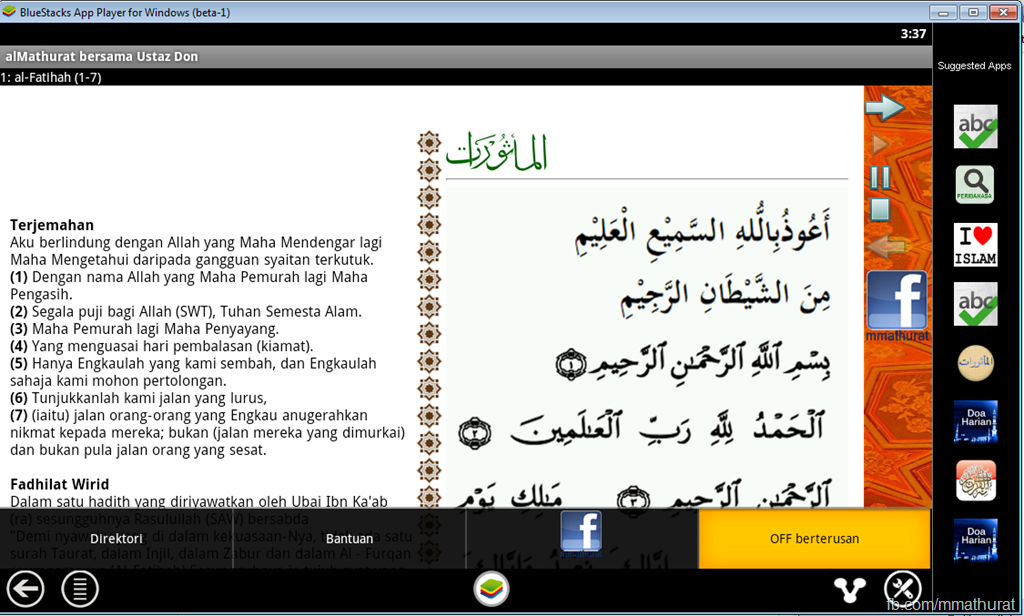
Running Android Apps on BlueStacks–Apps player for PC (Windows)

This is a good initiative for Android developer to test their Android apps should they do not have an Android device (an alternative to the boring official Emulator). The App Player is an effort by BlueStacks, they actually got funded for this idea and won the Best Innovation Award in CES 2012.
This application also useful for no-developer, to play Android apps on their PC. I personally use PULSE on the BlueStacks.
STEP1: Installing BlueStacks App Player
Your PC needs at least 1GB RAM, if you have less the installation will actually stop.
Download the installer here http://bluestacks.com/

 After the download completes, find the installer file and execute.  

Click Next.
image 
Choose Install.


Wait for a while.


Find the “Start BleuStacks” on the Windows button


Wait again for the BlueStacks App Player to load.
 Your email and click Next. 
 Ready to play an Android Apps.


STEP 2: Running your APK
If you do not any APK file, try download this –> http://bit.ly/m-mathuratkuis .
After the download finish just double click (alMathurat bersama Ustaz Don.apk). Your Windows supposedly recognise the APK file and associate it to the BlueStack App Player.


And, voila!!! Have fun…
Should you’d like to play your own Android apps, try locate the APK file in the bin forlder of your Android project. Normally all the project folders are in the folder called workspace.


Sunday, 23 December 2012

Android Key-logger: KidLogge


Zip File Attached with thread + Read 'readme' file to install in Android 2.1.. Installation tutorial below if for Android 2.2 above
***************************************************************
Installation 
***************************************************************
1. Install APK file ( KidLogger.apk )

2. Open KidLogger Application

Please note: 
- ON TABLETs install Tkeyboard.apk in order to open control panel, see below.

3. On the KidLogger control panel 
  - open settings > upload
  - and enter device ID from your KidLogger.net account dashboard.
  - click Send Test Report. 
    Ensure status is OK.
  - on the main screen click "Start Log" 
  - click "Back" to leave KidLogger app running on the background.

Now we needed to install kidlogger keyboard:


KidLoggerKeyboard.apk - virtual on-screen keyboard. replaces original keyboard and allows to record into KidLogger log all keystrokes.

1. Install KidLoggerKeyboard.apk 

2. go to Phone Settings > "Language & Keyboard" > enable "SoftKeyboard PRO" input method. 

3. Open "SoftKeyboard PRO setting" 
  - CheckInput Languages to enable more Input Languages in on-screen keyabord if you use a few one.

  - enter *123456# in order to open Kidogger control panel ( in case you have a Tablet)

4. In a web browser - a long-click (click and hold your finger 2 sec) over an Address Field  > choose "Input Method" 
    choose "SoftKeyboard PRO".

Done!

Now all typed text and keystrokes on this keyboard will be recorded to the log within KidLogger App. 
Also other phone activities are now logged into the log files separated by days.

***************************************************************
Removal
***************************************************************

1. Open Settings > Applications > find KidLogger in the list and click Remove.
2. the same for Soft Keyboard PRO.


***************************************************************
Known Issues
***************************************************************


1. On low-resources Phones\Tablets it may work unstable if all log options are enabled.
  Solution: Disable Clipboard Log, Idle, SD Card, Power, GSM events, WiFi, 

2. On Tablets a few logging options may not work : Clipboard Log, Idle, Power, WiFi, USB, FlyMode.

2. On Tablets a few logging options does not work : SD Card, GSM events, SMS, FlyMode, Calls 

"This tutorial is Education Purpose only don’t misuse it Trick2do will Not Hold any responsibility".

Saturday, 4 August 2012

How To Call Free Android to Android

                                       VIBER

Be Free to Communicate. Call and text anyone, anywhere.

Viber lets everyone in the world connect. Freely. More than 90 million Viber users call, text, and send
photos worldwide - for free.
Viber is available for Android devices and other smartphones. We are always introducing new features,
platforms and possibilities.
Viber is completely free with no advertising and we value your privacy.

               To Get Viber Click Here

Friday, 3 August 2012

HOW TO SEND FREE SMS ALL OVER THE WORLD USING YOUR ANDROID PHONE

Hello Every one this Post  is based on sending free sms over world hope you all will like it :))


  • First of all you have to download app for your android mobile, Download it from below link (contains .apk file) .
[#] To Download : Click Here 
  • Now you have to install it in your Android Mobile .

  • Open the app & then it will ask for registration, so register & while registration they ask some zip codes and that's very important to complete registration . write any one of the zip code form below .
1.    98660
2.    98661
3.    98662
3.    98663
4.    98664 
5.    98664
  • After completing registration, send free SMS to any where in world .

Note: 
  1. Even you can remove the advertisement . Just you have to open setting in app and go to signature and delete all and save it :)


  • Now this is necessary to know that  they provide you some other Number like ''+1593933929'' , so before sending SMS to your your friends or any one just tell them i am using another sender number,  so kindly change send reply on my number. if they reply you on pinger no.(which they provided you) .
  • Monday, 30 July 2012

    Make Free 10 Calls/Day for Unlimited Time using Crowd Call

    Crowd Call is basically a new and secure concept for conferencing your friends or business clients right from your smartphone. With Crowd Call you get 10 free calls/day to call over 40 countries worldwide. There is no time limit for any call 1 call can be as long as you want and the person you are going to call does not need to have any app installed in his phone, he just needs to have a valid phone number and he can be invited into conference.

    The only thing you need is an iPhone or Android device installed with the Crowd Call app and rest part is covered by crowd call itself, the other party do not need to have any app installed but just a regular number and they receive your call right by your own number.
    So as you can see in the above image I am just calling my friend "Atinder" whom I just chose from my contacts list and than I just pressed the Call Now button and I got a message that crowd call is in progress and I will receive a call soon. So now I just received a call from Crowd Call and when you answer you need to press 1 to start calling other party.
    Hmmm well now I hope I have cleared out everything well you can visit CrowdCall official website for apps download and further information. Thanks to my friend "Guneet Anand" for telling me about this wonderful app…

    Remember You get 10 free calls per day which you can use to call over 40 countries, on iPhone at a time you can select 2 person to call together and after the call is connected you can again minimize the call and call another two persons and merge call together for free 5 person conference call, and also repeat this step fro more person adding.

    Thursday, 26 July 2012

    Download Spiderman Total Mayhem HD Game For Android


    Spider man Total Mayhem for Samsung Galaxy Ace Plus-MiguelAngeloJ1998 (.apk+data files+instructions).zip  

    File Size:  282.49MB 


    To Download Click Here


    Spider Man v1.0.2 For Samsung. .apk

    File Size 5.35MB

    To Download Click Here

    Tuesday, 12 June 2012

    Root Your Android Phone With SuperOneClick


    how to root your android phone
    Root Options Available To Android Users
    In the early days of Android ownership, the process of “rooting” your brand-spanking-new and expensive Android device involved a fairly complicated 10 to 15 step process that involved the very real and present danger of “bricking” your Android phone and making it a worthless block of metal and glass.
    If you’re in the same boat and you’ve been fearfully avoiding the complicated rooting process like the plague, I’ve got some good news for you. There are now a fair number of one-click applications out there that will root your phone for you. These apps work on the large majority of Android devices. Don’t get me wrong ““ the danger of “bricking” is always there, but if you check to see that the app has been tested with your phone and version of Android, you should be safe enough.
    Just to give you some options to look at, some of the top one-click root apps for Android include Universal Androot, the Recovery Flasher,  Easy RootUnrevoked, and last but certainly not least ““ Super One-Click from XDA Developers. SuperOneClick is the app that I went with, and I believe it’s the app that will work for the majority of people reading this. But before you get started, don’t forget to enable USB debugging on your phone by going toSettings->Applications->Development and enabling “USB Debugging“.
    how to root your android phone
    Also, SDK is required. Just follow my instructions in the taking Screenshots article that I wrote a while back to install the SDK developers kit. Nothing else below will work until this is done. Take the time to do it, because it’ll also open up a lot of cool features like high-resolutionscreenshots, file exploring and easy file transfers. Once you’ve set it up, you’re ready to roll.
    android root access
    Download Super One Click, make sure you have the Android debugger (SDK developer kit) running, expand the Super One Click zip file and click the SuperOneClick icon to run it. When SuperOneClick launches, you’ll see several large buttons at the top of the screen. Make sure your phone is connected to the computer via USB and that the debugger can “see” it (activity will start logging). Make sure your SD card is not mounted, and go ahead and click “Root” in SuperOneClick.
    android root access
    You’ll see the scrolling activity as SuperOneClick does it’s job, with “OK” appearing after each task. You may see warnings, but so long as it doesn’t “hang” on waiting for device, things should keep scrolling until it finally returns the “Success!” message.
    android root access
    At this point, check out the installed apps on your phone and you should see a “Superuser” icon that looks like a Droid skull and crossbones. If you see it, you’re rooted. If you don’t see it, reboot the Droid. In fact, I’d suggest rebooting even if you do see it, as I had some issues getting rooted apps to work until I actually rebooted my own device.
    how to root android
    When you open up SuperUser, you’ll see that you can configure notifications so that no app can actually run with root access unless you give it permission. Also, according to the folks at Nexus One Forum, SuperOneClick doesn’t actually unlock the Bootloader, so you still retain your warranty. I haven’t confirmed if that’s true or not, but if true it’s a pretty good plus to using SuperOneClick with the SDK approach.
    how to root android
    Whenever you run an app that requires root (superuser), you’ll see a notification requesting permission. I like this because it also means that if an app gets installed and tries to utilize superuser access without your knowledge, it can’t.
    how to root android
    If you check off “Remember”, the program gets added to the list of “approved” apps with superuser access. You can see the ones on your list when you click on the “Apps” tab.
    how to root your android phone
    As you can see, once you have SDK installed and connected to your phone, the process is as simple as installing and running SuperOneClick. The program takes care of rooting your phone from the PC. Finally, you can enjoy a rooted Android phone, and all of the fun and excitement that offers!
    Did you give any of the one-click Android root apps a try? How was your experience? Share your rooting adventures in the comments section below.

    Move applications from internal memory to sd in android


    Running out of Memory in android ?
    Internal memory full in android ?
    Android freezes due to low internal memory space ?
    Here we come up with a special application which allows you to move almost all applications from the internal memory of your android to the sd card.
    Note:This application requires root access.
    I have already made a tutorial on rooting your android.Check it here
    1.Download link2sd from here
    2.Next you have to pratition your memory card in to 2 primary partitions.The first partition must be of FAT file system,and the second one can be EXT3 or EXT4, i recommend you to go with EXT3 for second partition as EXT4 is not supported by some custom ROMS.The partition can be done using ‘mini tool partition wizard’ which can be downloaded here
    3.Have a maximum of 1gb or 1.5gb for the first partition.
    4.Now inset your sd card into your phone
    5.Now install link2sd
    6.Now select an application which u have to move and select Link application file,Link dalvik-cache file,Link library file.
    Thats it.You have moved the applications.
    Feel free to post your queries !

    Way to Download Android Applications for Free with BlackMart


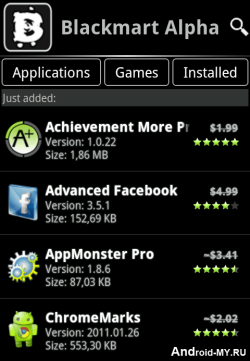
    blackmart-alpha-appBlack Market is another similar application to Applanetwhich we posted earlier and allow you to download thousands of Android Applications and Games right to your device that too for free. It’s a simple .apk app which you can transfer to your device and than install it in a normal way.

    Its officially not known as Black Market but its called BlackMart Alpha, it’s a new version which is the improved one and brings many bug fixes. You canDownload BlackMart Alpha Android app and than transfer that file to your android device.
    After installation Fire-Up the app and your will interface like on the right hand side image, juts browse entire collection of wonderful apps and games which can be downloaded easily.
    Well the another way of downloading Android Apps for free is using 4Shared which you can also check out. Well hope that you like this applications and would love to download many many apps. If you find this post useful than make sure to share it with all your friends.

    Way to Install Paid Android Applications For Free


    Paid Android Apps for FreeAfter iPhone Android is the second largest OS with so many Apps and when the word comes Apps people search for the Free versions for the Paid ones and you can get some of them but how to get all of them easily well we have a brilliant way to get you all the Android apps for free and that too easily just download and Install that’s it so follow the below steps .:
    Follow the below steps to get Android Apps for Free .:
    1. Go to 4Shared.com
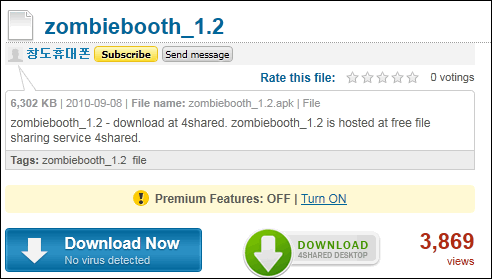
    2. Search for the app you want for your Android Device and remember to add .apk @ last of every app you search ( Check the below Screenshot )
    Paid Android Apps for Free
    3. Now you will search results like these below .:
    Paid Android Apps for Free
    4. Click the one you like or which fits well that’s it click download and enjoy the install as in the image below .:
    Paid Android Apps for Free
    5. So have FUN Guyz and if you really loved this article make sure to click +1 below and Like this Post and Share it with your Friends.