Showing posts with label mobile. Show all posts

Monday, 18 March 2013

How TO Send Fake SmS


How to Send Fake SMS With Others Mobile Number
Fake Sms is a fun way to prank out with your dearest friends. Well this should only be used for a limited access to play with your Homies but some can take advantage of this technique and f*** everything up by pranking and making problems for others.
With this trick you would be able to send Fake Sms from anyone's number, Yes that’s right you can put your friends enemy number and send him a message. You can do anything but remember this is just for educational purpose any illegal attempt can be taken as a serious crime.

Procedure For Sending Fake Sms :

1. Go to SmsGlobal.com
2. Now simply click the New User and sign up for an account entering credentials like I have done in the image below.
How to Send Fake SMS
3. After successful sign up you will see the confirmation that code has been sent to your phone.
4. Now simply grab your registered mobile number and go to SmsGlobal.com and put your Username and your Password which you received on your mobile number.
How to Send Fake SMS
5. You will see Window like above simply click on Send Sms to Number.
6. You will be presented with this layout just enter the information as said in the image below.
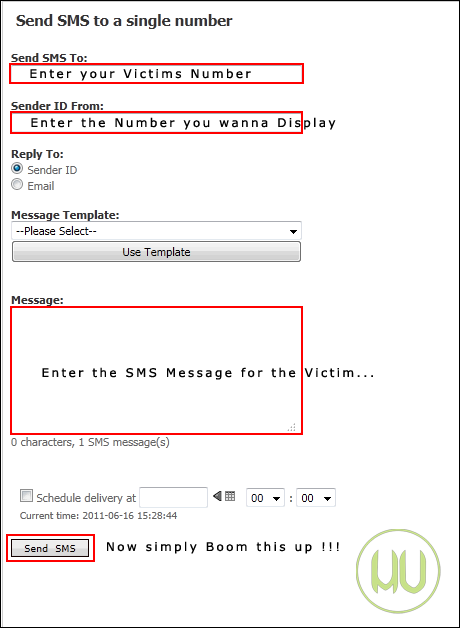
How to Send Fake SMS
7. That’s all, you were successful to prank your dearest friend so have fun with this service but don’t make anyone cry with this service.
Update : As reported by many readers now this website does not provide you with any free credit so you have to purchase their account to get it to work.
Disclaimer : The post is for educational and fun purpose only, HackingUniversity is not responsible for any kind of loss or damage. Its is considered as illegal, Do this @ ur own risk.

Thursday, 7 March 2013

Send Online Free SMS without Internet from Airtel & Docomo


160by 2 and Way2SMS are the two biggest name’s in online message marketing, they have individual and business accounts that can be used to greet and send money making advertisements through sms. Well obviously you need Internet to get access to these services and even to send messages to your friends. But obviously telecom brands come up with some offers that you can use there service to send free sms without any internet so now Airtel and Docomo have come with an service to send sms through 160by2 and Way2SMS but without internet and that too from your Airtel and Docomo numbers.
Now this trick is pretty much working for both 160by2 and Way2SMS using your Airtel and Docomo Numbers. So just check out below steps and enjoy.
NOTE Make sure that your balance is Rs.1, else your money can get deducted per sms. So if its is Rs.1 this trick will work and your money will not get deducted.

160By2 SMS without Internet from Airtel & Docomo

Well I tried using 160By2 account with this trick and it worked I just got my account created and my sms were activated so now I can send free sms from my Airtel number to anyone using 160By2 and that too without any access to internet. So now if you want to send free sms from 160By2 just follow below steps.
free-sms-without-internet
  1. Open up your messages and create a new message to 55444 typing below message.
    #ACC username password
  2. Now just replace the username and password with your 160By2 credentials.
  3. Now you will receive a response message from them saying account verified and created, just check the above screenshot.
  4. Now your account will be created you can send free sms, make sure balance is Rs.1
  5. Just create a new message with below format.
    #SEND 999xxxxxxx Hey Wazz ! Up.
  6. Now replace xxx with your friends mobile number and than your personal message.
  7. That’s it now just send this message and your friend will get your message.

Way2SMS without Internet from Airtel & Docomo

Well I do not have any screenshot demonstration for Way2SMS as I have not tested this one but you can follow below steps and start your own free messaging.
  1. Make sure your balance is less than Rs.1.
  2. Now create a new message to 55444 typing #SMSFree to get more information.
  3. Now to register yoru Way2SMS account just send the below message.
    #smsfree reg username password way2sms
  4. Now replace the username and password with your Way2SMS credentials.
  5. Now your will be logged in, now type below message to send free sms.
    #smsfree 1 999xxxxxxx Hey Wazz ! up.
  6. Now replace xxx with your friends mobile number and your personal message.
  7. That’s it now just send this message and your friend will receive it on their mobile.
So now in this way you can send free sms to your friends with your mobile without using internet. If you find this post useful just share it with your friends :)

Friday, 3 August 2012

HOW TO SEND FREE SMS ALL OVER THE WORLD USING YOUR ANDROID PHONE

Hello Every one this Post  is based on sending free sms over world hope you all will like it :))


  • First of all you have to download app for your android mobile, Download it from below link (contains .apk file) .
[#] To Download : Click Here 
  • Now you have to install it in your Android Mobile .

  • Open the app & then it will ask for registration, so register & while registration they ask some zip codes and that's very important to complete registration . write any one of the zip code form below .
1.    98660
2.    98661
3.    98662
3.    98663
4.    98664 
5.    98664
  • After completing registration, send free SMS to any where in world .

Note: 
  1. Even you can remove the advertisement . Just you have to open setting in app and go to signature and delete all and save it :)


  • Now this is necessary to know that  they provide you some other Number like ''+1593933929'' , so before sending SMS to your your friends or any one just tell them i am using another sender number,  so kindly change send reply on my number. if they reply you on pinger no.(which they provided you) .
  • Tuesday, 31 July 2012

    Samsung wave 2 s8530 Firm Ware

    Samsung Wave -II S8530Firmware Download


    Samsung Wave ll (S8530) running Bada 2 (S8530XPKH1)

    Firmware downloaded from Here

                    OR


    Download The Latest Firmware for your phone from Here:


    Instructions for flashing your phone is Here


    Firmware runs smoothly once debugging level is set to low
    This is done by typing *#33284*# and selecting low.


    Watch Video